
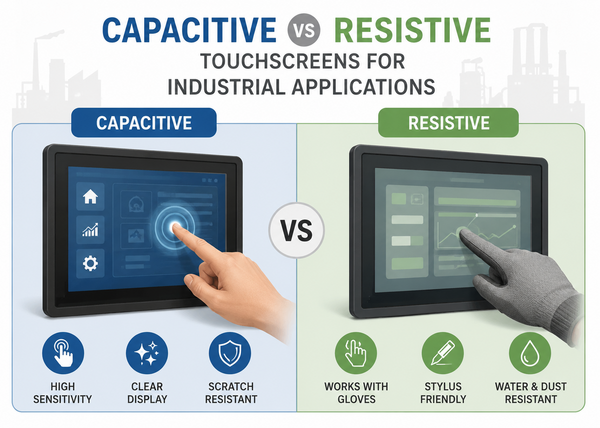
Capacitive vs Resistive Touchscreens for Industrial Applications
Modern industrial environments rely heavily on touchscreen technologies for machine control, process monitoring, operator interaction, and industrial visualization. From factory automation systems to warehouse management and SCADA interfaces, industrial touchscreen displays have become essential components of modern industrial infrastructure.
Capacitive vs Resistive Touchscreens for Industrial Applications
Capacitive or resistive? For industrial HMIs, the right touch technology depends on gloves, liquids, light conditions and how long the device has to last. Here is how the two technologies compare – and how to decide for your application.
Every industrial HMI project reaches the same question sooner or later: should the display use a projected capacitive (PCAP) or a resistive touchscreen? There is no single right answer. A touchscreen that works perfectly in a clean control room can fail in a washdown area, at a loading dock or in the hands of an operator wearing thick work gloves.
This guide explains how both technologies work, where each one performs best, and which questions to answer before you decide.
A PCAP touchscreen uses a grid of transparent electrodes behind a glass cover. A finger changes the electrical field at the touch point, and the controller calculates the position. Because the sensor responds to conductivity rather than pressure, a light touch is enough – and several touch points can be detected at the same time.
A resistive touchscreen consists of two conductive layers separated by tiny spacer dots. The top layer is usually a flexible PET film. Pressing the surface pushes the layers together, and the controller measures the voltage at the contact point. Because it reacts to pressure, a resistive screen works with any object: a bare finger, a thick glove, a stylus or a tool.
There are two common designs:
| Criterion | PCAP | Resistive |
|---|---|---|
| Input | Finger, capacitive stylus; gloves with tuned controller | Any object: finger, glove, stylus, tool |
| Multi-touch and gestures | Yes | Usually single-touch |
| Touch force | Light touch | Requires pressure |
| Surface | Glass – scratch-resistant, easy to clean and seal | Plastic film – can be scratched by sharp objects |
| Optical clarity | High, often around 90 % light transmission | Lower, typically around 80–85 % |
| Durability | No mechanical wear of the sensor | 4-wire: wear over time; 5-wire: much longer life |
| Water on the surface | Manageable with water-rejection tuning | Largely unaffected by drops |
| EMC sensitivity | Requires careful EMC design | Less sensitive |
| Cost | Higher, especially with thick or special glass | Lower |
Values are typical figures. Actual performance depends on the specific sensor, controller and integration.
Modern operator interfaces. Pinch-to-zoom, swipe gestures and smartphone-like operation are only possible with multi-touch. For SCADA dashboards, visualisation and complex HMIs, this noticeably improves usability.
Readability and image quality. The glass front lets more light through and, combined with optical bonding, reduces internal reflections. This makes PCAP the usual choice for bright environments and sunlight-readable displays.
Hygiene and sealing. A flat glass front without edges is easy to clean and to seal against the housing – important in food processing, medical technology and laboratory equipment.
Robustness. Thick or chemically strengthened cover glass protects the display against impact and vandalism. Industrial PCAP controllers can be tuned to work through several millimetres of glass.
What to watch out for: standard PCAP settings are designed for bare fingers. Glove operation and water rejection must be specified and tuned for the application, and the EMC design of the whole system has to be right – otherwise, electrical noise from motors or drives can cause false touches.
Thick gloves and tools. If operators wear heavy work gloves or use a stylus or tool, resistive technology works without any special tuning.
Cost-sensitive, simple interfaces. For a single-touch control panel with buttons and menus, resistive is often the most economical solution.
Replacing existing displays. In older machines, the software and controller are often designed for resistive touch. Replacing like with like avoids software changes.
What to watch out for: the plastic top film can be scratched by sharp objects and ages over time, especially under strong UV exposure. The lower light transmission makes the display appear darker – a disadvantage in bright environments.
At T&O Electronic Solutions, we don't start with the technology – we start with the application. We clarify the operating conditions, glove types, cleaning agents, light conditions and mechanical integration. Based on this, we recommend the touch technology, cover glass, bonding method and controller configuration, and test the result under conditions close to the real application.
Learn more about our industrial touch display solutions and how we develop custom touch displays for OEM applications.
Yes, but not out of the box. Industrial PCAP controllers can be tuned for thin gloves and, depending on the controller, for thicker work gloves. The glove type should be defined early in the project and tested with the final cover glass.
Industrial PCAP controllers offer water-rejection modes that ignore droplets and films of water. With running water or water jets, the behaviour should be tested for the specific application.
No. For glove and tool operation, simple interfaces and cost-sensitive applications, resistive is still a sound choice. For new designs with modern user interfaces, however, PCAP has become the standard.
Often yes, but the controller interface, software and housing may need adjustments. A short technical check before the switch avoids surprises.
Describe your application, environment and operating concept – our engineers will recommend the right touch technology for your project.